Kaption: a real-time subtitle translator for Hoyoverse games
Genshin Impact is a story-heavy game. The writing is genuinely good in places, the voice acting is often excellent, and the quests run for hours. The problem is that a lot of people play these games in a language they only half-understand. English is the default fallback for most non-English players, but reading English dialogue while a Chinese or Japanese voice track plays means you either miss the performance or miss the meaning.
Polish players have it worst. There is no official Polish localisation for Genshin Impact or Honkai: Star Rail, and there probably never will be. The existing community answers all have a catch. Streamed translators like OBS plugins lag behind dialogue by a second or two. Mod packs that swap the game's text files break on every patch and put your account at risk. External programs that hook into game memory are, frankly, a bad idea for any live-service game with anti-cheat.
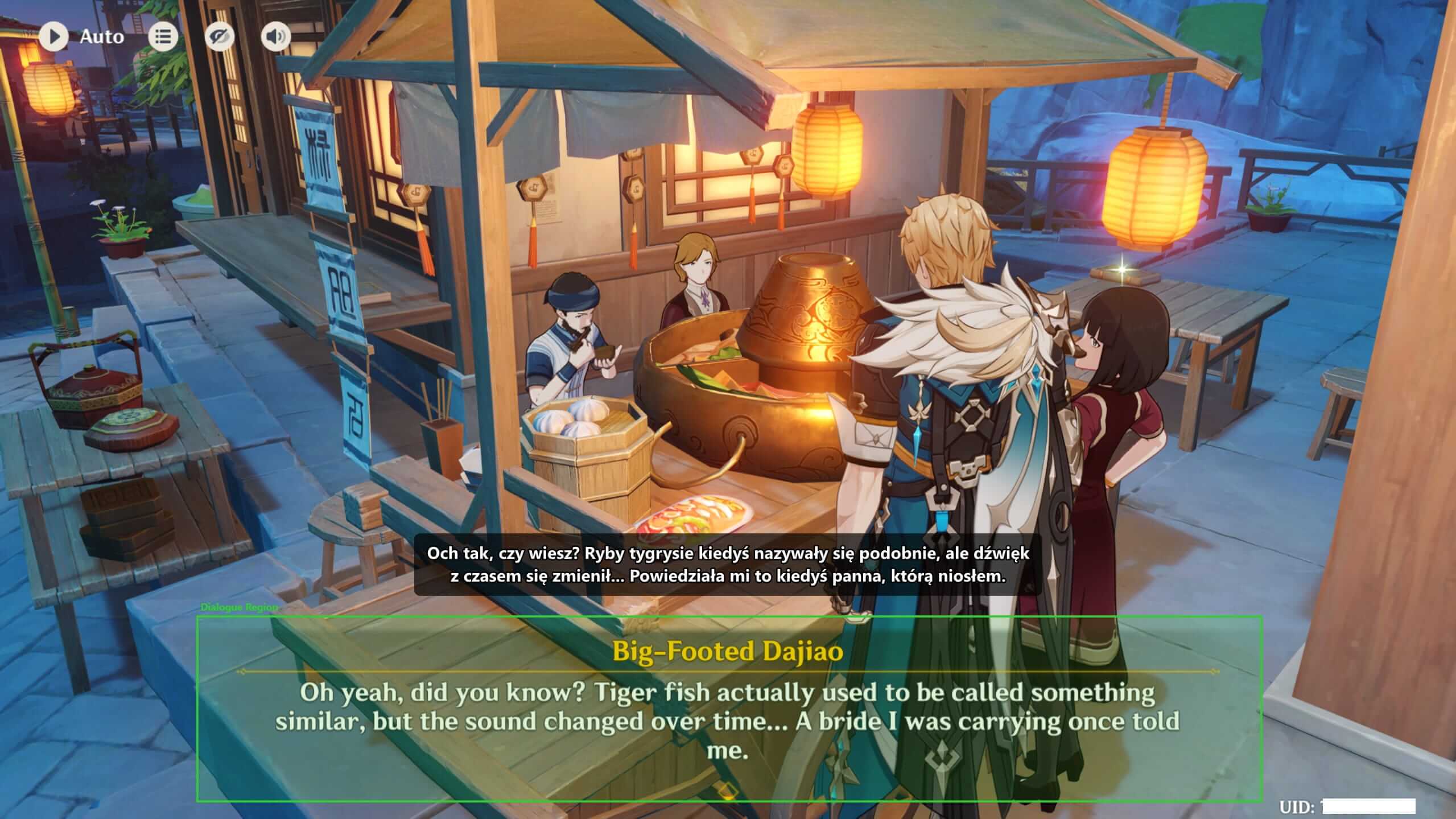
Kaption is my answer. It's a Windows desktop app that reads the dialogue region of the game window like a screenshot, recognises the text with a local OCR model, matches it against the game's own shipped text bank, and shows the translation in a second overlay window. It never touches the game process. Nothing is hooked, nothing is injected, nothing is uploaded. The whole loop runs on your machine in about 80 milliseconds.
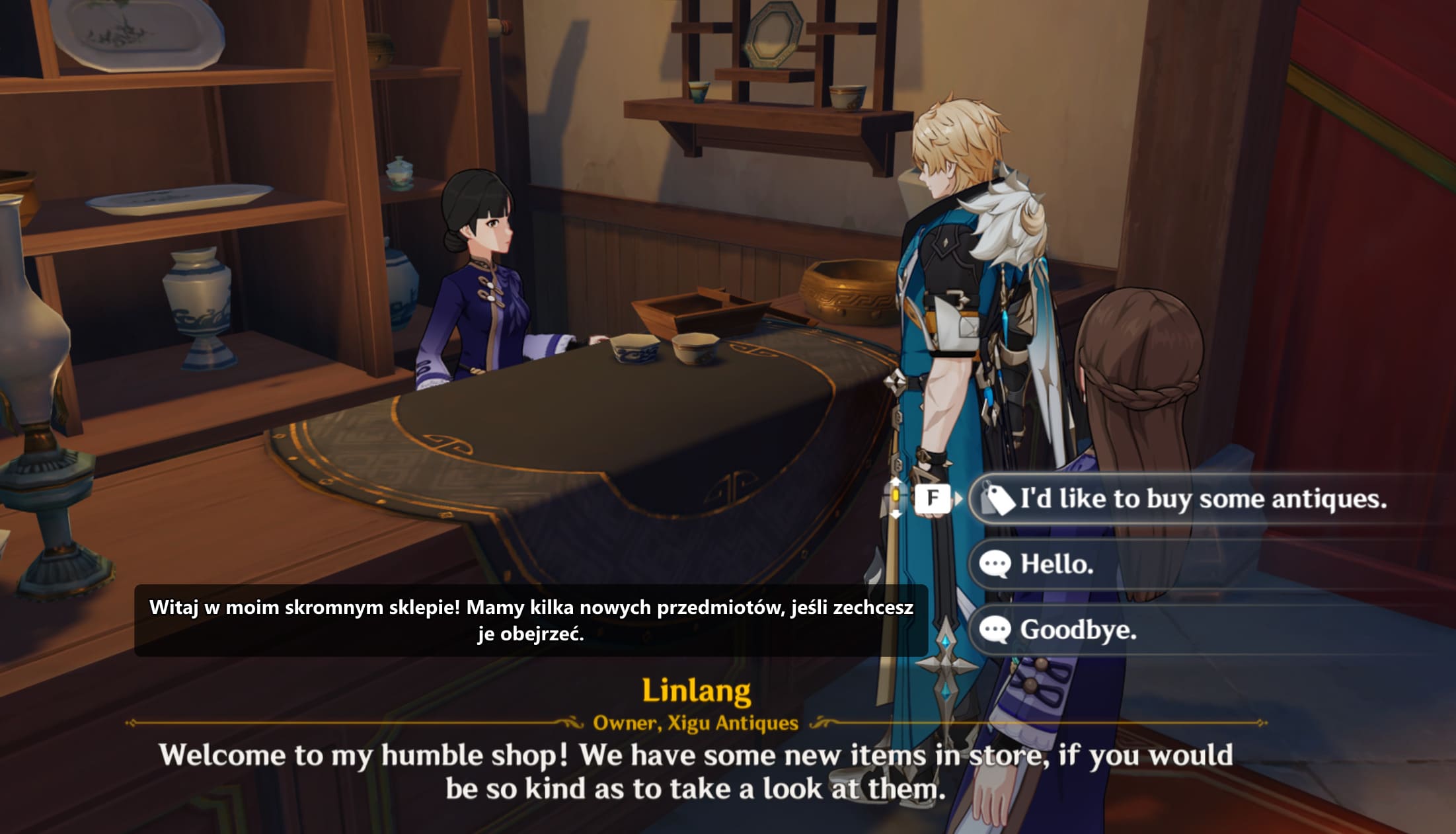
The problem: what do you do when the game isn't in your language?
Hoyoverse ships its games in English, Chinese, Japanese, Korean, Spanish, French, German, Russian, Indonesian, Portuguese, Thai and Vietnamese. That sounds like a lot until you're one of the hundreds of millions of people whose first language isn't on the list. Polish, Czech, Hungarian, Dutch, Greek, Turkish, all the Nordic languages, pretty much every language in Africa — none of these have an official localisation. For a game that leans so heavily on its writing, that's a real gap.
The community has tried to fill it. Most attempts fall into two buckets. The first is mod-style text replacement: take the game's TextMap file, swap it for a translated copy, ship the result as a modpack. That works for about two weeks. Then Hoyoverse pushes a patch, the TextMap file format shifts, the modpack breaks, and every player has to redownload and reapply. It also puts translated content inside the game process, which is exactly the kind of file change that makes anti-cheat systems nervous.
The second bucket is worse: external programs that hook into the game's memory to pull dialogue strings directly. These work beautifully until they don't. Any program that attaches to a live-service game's process is one driver update away from looking identical to a cheat. Getting your account banned for trying to read a translation is a pretty miserable trade. Neither approach scales past a single patch cycle, and neither is safe to recommend to a casual player.
Why an overlay, not a mod
Once you rule out file swaps and memory hooks, there's really only one approach left: read what's already on screen. Screen capture is the same thing Windows Snipping Tool does. It's the same thing every screen recorder does. Anti-cheat systems have no reason to flag it because nothing about the game is being modified, read, or touched. You're just looking at the picture the game is already drawing.
That reframes the whole problem as a computer-vision problem. Grab the pixels, find the text, translate the text, draw the result in a separate window. The game doesn't know Kaption exists. If you close Kaption, the game keeps running as if nothing happened. If Kaption crashes, the game doesn't notice. That clean separation is the whole reason the approach is worth building.
Why the overlay approach is safe
- •No file changes. The game's install directory is never opened, read, or written to. Patches can't break anything.
- •No memory access. There's no ReadProcessMemory call, no DLL injection, no process handle opened against the game. Anti-cheat has nothing to flag.
- •No network hook. Kaption doesn't watch the game's traffic and doesn't stream captures anywhere. OCR runs locally.
- •Clean teardown. Close the overlay and the system returns to exactly the state it was in before. No registry hooks, no background services.
How the pipeline works, end to end
The whole loop is five steps. Each one has to be fast, because the sum of their latencies is what the player actually feels. If any single step blows its budget, subtitles start to drift behind the voice track and the illusion breaks.
- 1. Capture. Grab the game window via DXGI Desktop Duplication, which is GPU-accelerated and near-free on modern hardware. Budget: about 2 ms per frame. A GDI fallback exists for older systems or weird virtual display setups.
- 2. Mask. Before the capture goes to OCR, zero out the rectangle where Kaption's own overlay sits. This avoids a feedback loop where the translation the app just wrote gets re-recognised on the next tick. We learned this one the hard way.
- 3. Binarise and OCR. Binarise the dialogue region, then run PaddleOCR through ONNX Runtime with the DirectML provider. On a GPU with DirectML that's under 10 ms. On CPU it's 40–80 ms, which is fine but leaves less headroom for everything else.
- 4. Match. Run the recognised text through the three-stage matcher against an in-memory hashmap of 500,000+ lines from the game's TextMap. Worst case a few milliseconds, best case 5 microseconds.
- 5. Render. Look up the pre-translated line for the matched ID, push it to the WPF overlay, position it above the dialogue box. Sub-millisecond.
Typical end-to-end latency on a mid-range machine is around 80 milliseconds from text appearing in the game to the translation appearing in the overlay. That's inside the window where humans stop noticing the delay. A slower machine without a DirectML-capable GPU pushes it closer to 150 ms, which is still usable but visibly lagging the voice.
Under the hood, the app uses a dual-timer architecture. The OCR loop ticks at 100 ms by default. The UI loop ticks at 200 ms. Separating them means the animation that slides the translation in stays smooth even when the matcher is chewing on a particularly noisy frame. A lot of the responsiveness work on Kaption looked a lot like the work in my write-up on performance testing and optimisation: find the slowest thing in the loop, fix it, measure again.
One detail that turned into a quiet source of bugs was the typewriter animation Hoyoverse uses for dialogue. Letters appear one at a time. If you OCR a frame halfway through the typewriter, you get a partial sentence that matches nothing. The fix is a frame stability gate: only accept a frame for matching if the same bounding box and text hash stayed stable for two consecutive captures. That sounds simple now. It took a weekend to diagnose the first time.
The matcher is where the interesting work lives
OCR output isn't clean. A good model on a clean frame still trips over things like rn versus m, l versus 1, O versus 0. Ask any OCR engineer and they'll name the same confusion pairs. Naive Levenshtein distance treats all those substitutions as cost-1 edits, which works, but is noisy and throws false positives into your candidate set.
Kaption runs a three-stage pipeline instead. Each stage handles the output the previous stage couldn't confidently resolve, so the common case stays fast and the hard case still gets a good answer.
- Stage 1 — SymSpell. Symmetric-delete spellcheck on an index of every line in the game's TextMap. For an exact or near-exact match, this returns in about 5 microseconds. It's a hashmap lookup with pre-computed deletions, so you never iterate the dictionary.
- Stage 2 — n-gram candidates. If SymSpell doesn't find a hit within a small edit distance, narrow the search space by building a shortlist of candidate lines that share character trigrams with the OCR output. Hundreds of candidates, not half a million.
- Stage 3 — weighted Levenshtein. For each shortlisted candidate, run Levenshtein with an OCR confusion matrix: substituting
rnformcosts 0.2, swappinglfor1costs 0.3, replacing an arbitrary letter with an unrelated one still costs 1.0. Pick the candidate with the lowest weighted distance, gated by a confidence threshold.
In practice, the SymSpell fast-path hits around 85 to 90% of the time. The n-gram stage picks up most of the rest. The weighted Levenshtein is the safety net for genuinely noisy frames, the ones with particle effects crossing the dialogue box or weather effects softening the text. End-to-end match rate lands at about 97%, which is enough that you stop noticing the misses.
Here's what a misread looks like flowing through the matcher in practice:
OCR output:  "Paimon wi11 take care of it, trust me!"
                        ^^
Stage 1: SymSpell — 0 exact hits (the "11" kills it)
Stage 2: n-gram — 14 candidates in TextMap share trigrams
Stage 3: weighted Levenshtein
         best match: "Paimon will take care of it, trust me!"
         cost:       0.3  (l↔1 substitution, twice, weighted)
         confidence: 0.97 → accepted
→ lookup translated line, render in overlay
The matcher lives in a hot loop, so every allocation counts. The index is built once at startup and the hot path uses pooled buffers. That's the kind of micro-optimisation that only shows up when you profile, and it's the kind of thing a modern .NET runtime makes actually pleasant to do compared to the older framework.
Dialogue graph prediction
Genshin and Star Rail ship their quest dialogue as directed graphs: each line points at its possible next lines, with branching for player choices. If you know the current line ID with high confidence, you know the five or six lines that can come next. That's a huge prior.
Kaption uses this by pre-caching the translations for the predicted next lines as soon as the current line is matched. When the next line appears on screen, it's already in the overlay's render path. On a known quest flow the perceived latency drops toward zero, because the work is done before OCR even runs. You see the Polish line almost at the same instant the voice starts.
For free-roam NPCs and side dialogue that isn't in the quest graph, the app falls back to the normal OCR path. The graph is a fast-path, not a dependency.
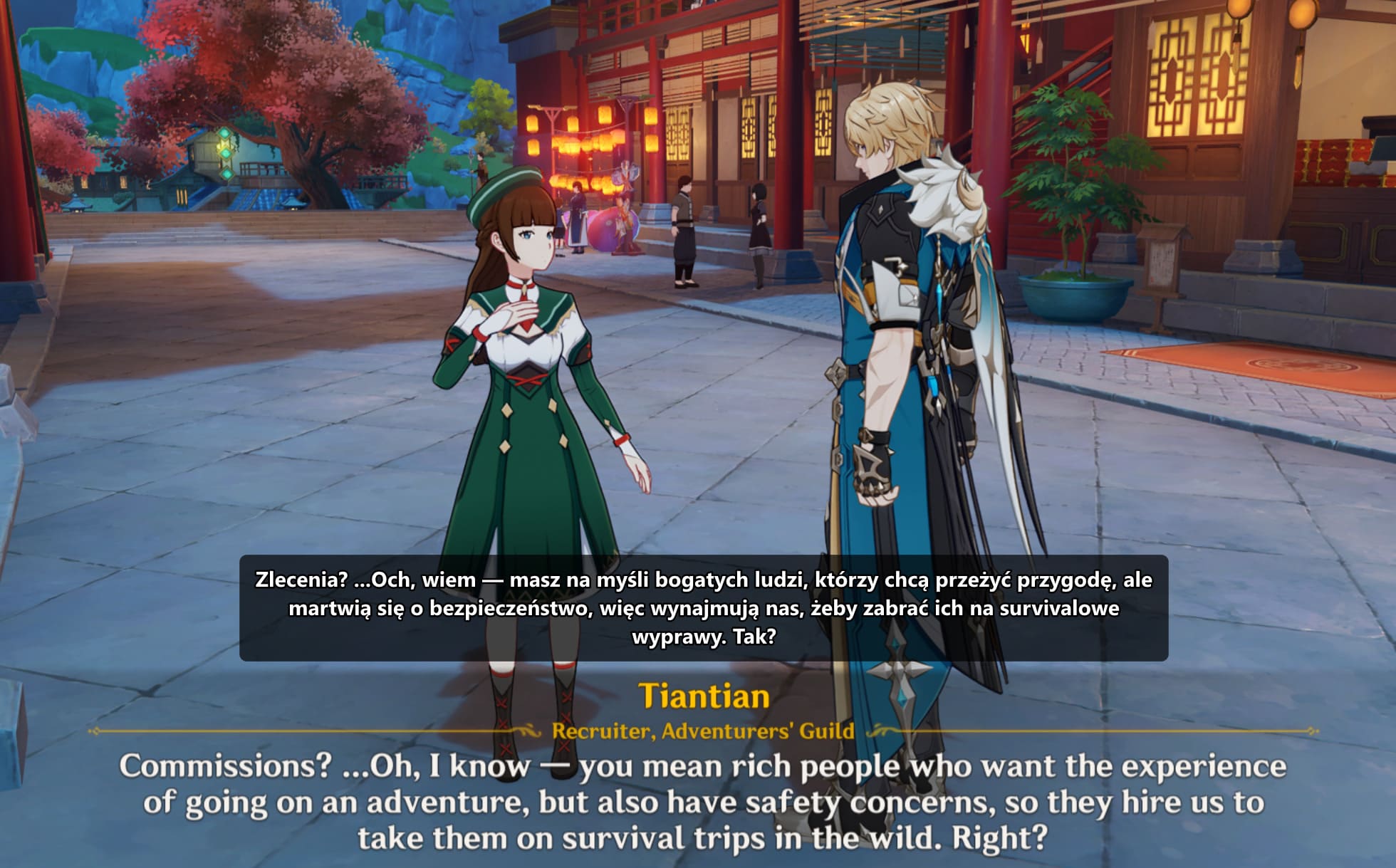
Translation quality: not another Google Translate
The quality of the overlay is only as good as the translations it's serving. A word-for-word translation of a dialogue line is almost always worse than a translation that knows who's speaking, what quest you're on, and what was said thirty seconds ago. Names, titles, in-world jargon — all of it has to stay consistent across the thousands of lines that reference it.
The translation pipeline is offline and runs per line with full context: the speaker's name and voice, the current quest, the preceding lines in the dialogue graph, and a glossary of in-game terminology locked per game. Each line is translated once, reviewed, cached, and shipped in the translation pack. The player never waits on a cloud API. The quality doesn't drift between sessions because nothing is regenerated at runtime.
That's what separates this from the streamed translators that hand dialogue to Google Translate a line at a time. Those will always butcher proper nouns, because the translator has no memory of what got translated two sentences ago. Kaption's pack ships with a consistent glossary — Teyvat is always Teyvat, the Traveler is always the Traveler, Paimon stays Paimon.
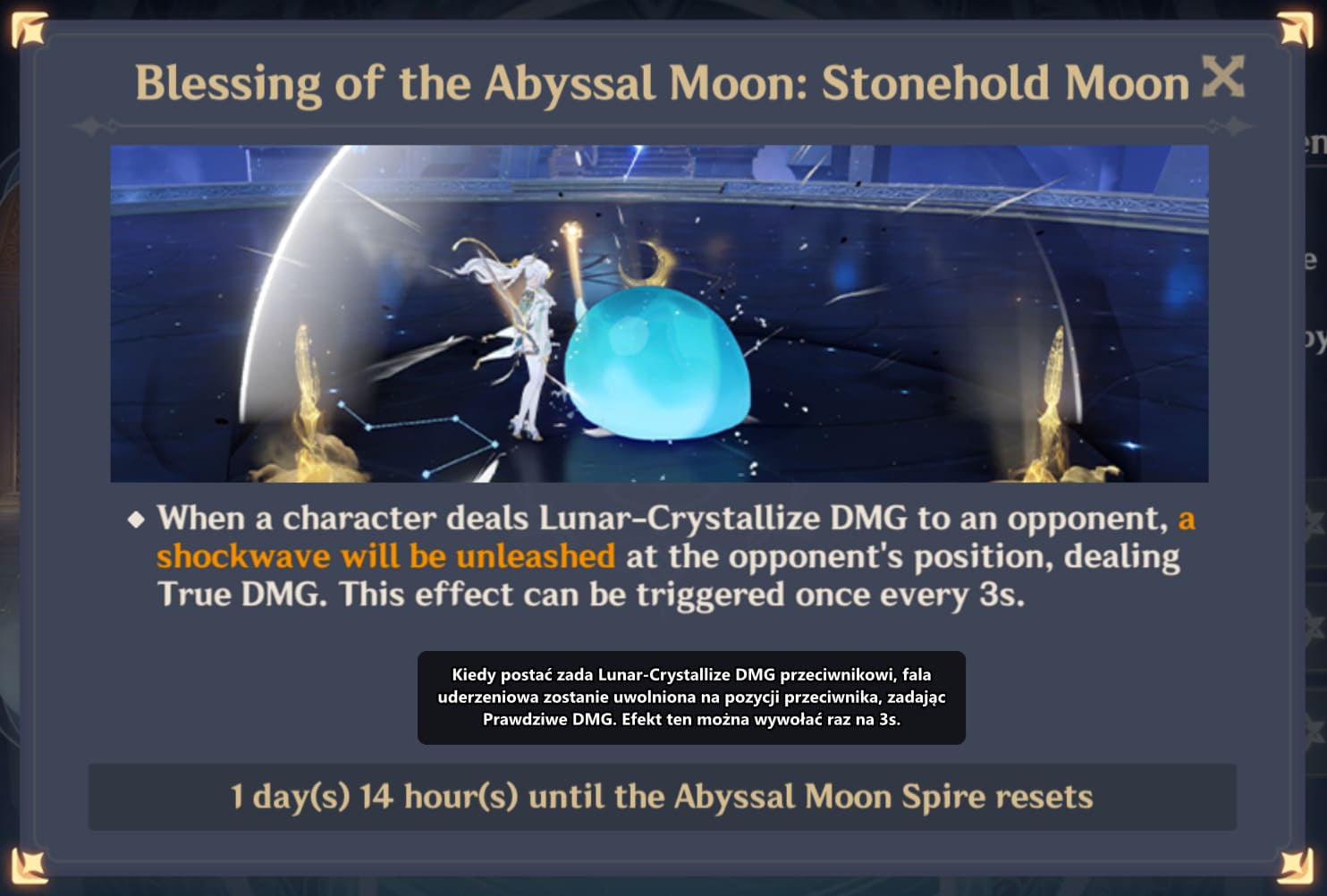
Local-first, privacy, and safety
Kaption runs entirely on your machine. The OCR model is local. The matcher is local. The translation packs are local files. There is no cloud round-trip in the hot path and nothing about your game session is streamed anywhere. Crash reporting is opt-in and off by default; the first-launch dialog asks once, your answer is remembered, and no data leaves your machine unless you say yes. That's the same principle I've written about in the context of production observability: collect what you need to do your job and nothing more.
The translation packs themselves are sensitive. A lot of volunteer and paid translation work goes into each one, and shipping them as a plain JSON file on a CDN would mean anyone could grab a copy and redistribute it. So the packs are encrypted with AES-256-CBC and authenticated with HMAC-SHA256, keyed with a PBKDF2-stretched key that's bound to the user's machine. A .gisub pack copied from one machine cannot be decrypted on another.
The capture itself uses exactly the same Windows APIs that Snipping Tool uses. If you're comfortable with Snipping Tool reading your screen, you're comfortable with Kaption reading your screen. Nothing about the game's process, files, memory, or network is visible to the app, and that's a design constraint, not an accident.
Deployment, updates, and the install story
Shipping a Windows desktop app in 2026 is less painful than it used to be, but not trivial. The install bundle includes a self-contained .NET 10 Desktop runtime, so the user doesn't need to download or install anything else. Total install size is about 350 MB, most of which is the OCR model and the runtime. There's no prerequisite dialog, no UAC prompt for the install itself, no admin rights needed. It drops into the per-user AppData folder and runs from there.
Updates are handled by Velopack. A JSON feed on Cloudflare R2 advertises the latest version. The app polls that feed, pulls a binary delta (not a full installer) if one is available, and applies it on next restart. No background service, no scheduled task, no elevated privileges. You can uninstall by deleting the folder if you want to. That's unusual for a Windows app and it's deliberate. For the UI side, the lessons here were a direct continuation of what I wrote about in WPF modernisation: the current stack makes layered windows, click-through overlays, and per-monitor DPI actually pleasant to work with.
The landing page at kaption.one runs on Astro and Tailwind with a Supabase backend for the waitlist and voting data. That's a completely separate codebase from the desktop app, and that split works well: marketing changes daily, the desktop app ships on a much slower cadence.
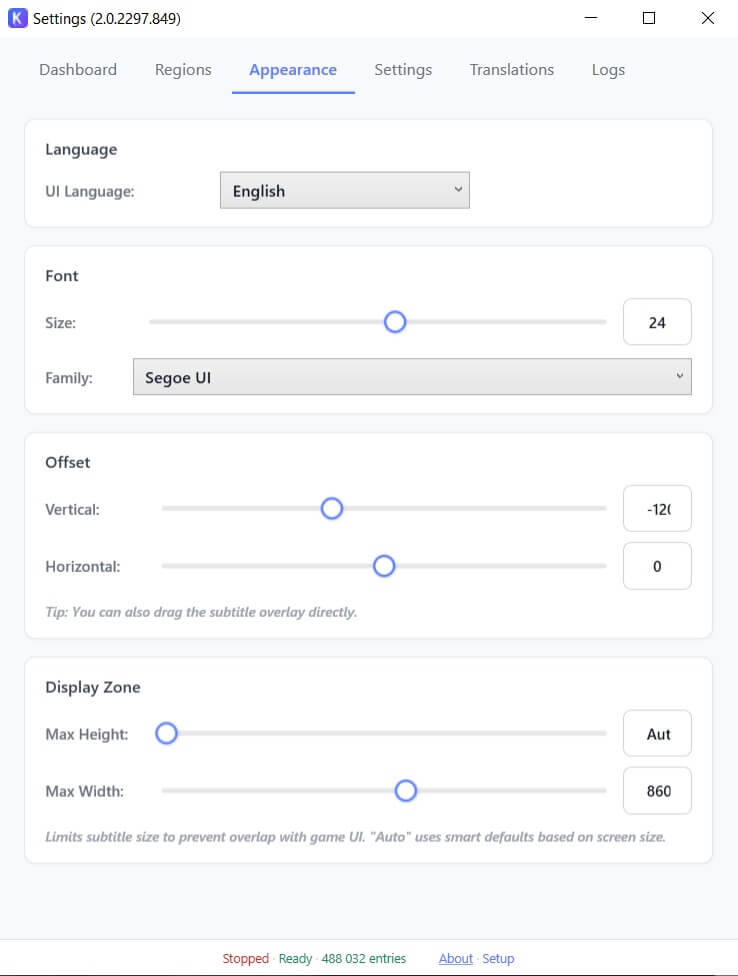
Honkai: Star Rail support ships on the same release cadence, using a separate per-game tuning profile. The dialogue box lives in a different spot, the font is different, and the text styling has its own quirks, so the OCR tuning is per-game rather than global.
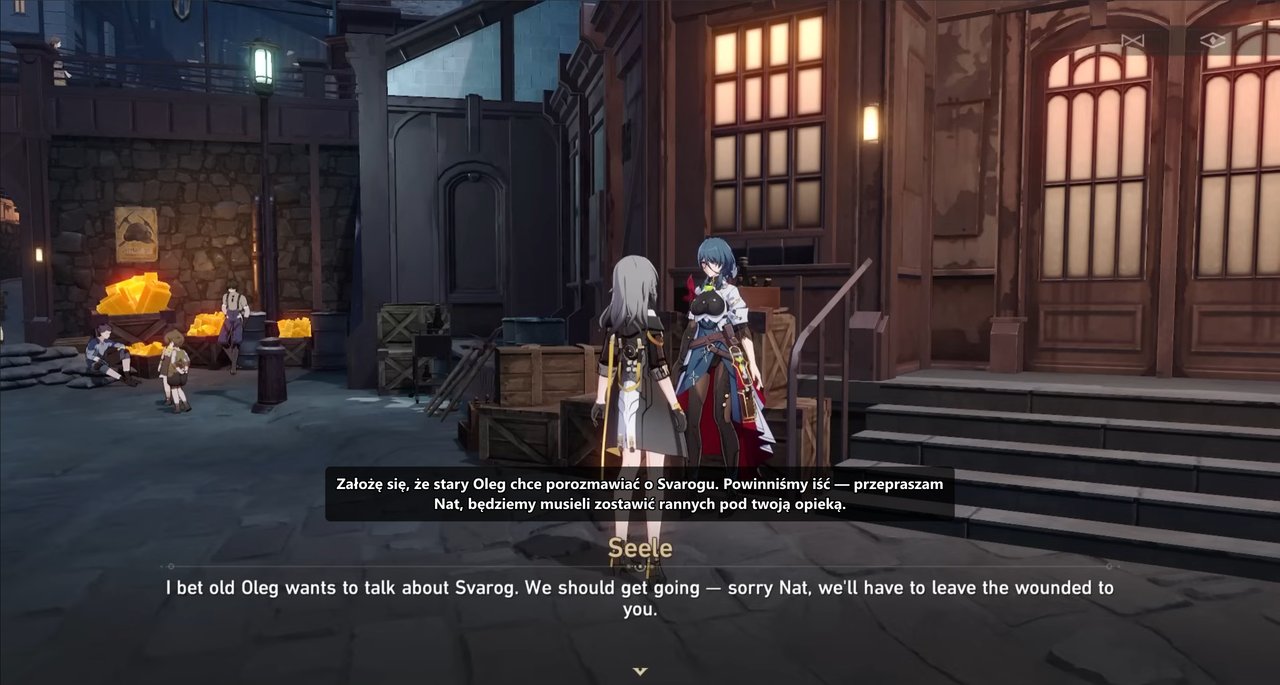
First-run setup is a short wizard that auto-detects the dialogue region once the game is in the foreground. If the auto-detect gets it wrong, you can drag a rectangle manually. Most users never need to touch it.
Numbers that matter
Some of these are targets the app is measured against every release. Others are boundaries of what the system is expected to handle.
End-to-end latency on a mid-range machine
From pixel on screen to translation in overlay
Match rate against the TextMap index
Measured on mixed questline and free-roam dialogue
TextMap lines indexed
Loaded once at startup into an in-memory hashmap
SymSpell fast-path
Exact and near-exact matches return this fast
Supported at launch
Genshin Impact and Honkai: Star Rail, per-game OCR profiles
Potential target languages
Any language with a shipped translation pack
Technology stack and the reasoning behind each choice
The stack is boring on purpose. Boring is what ships. Everything below was picked because it solved a specific problem better than its alternative, not because it was new or interesting.
Desktop and OCR
.NET 10 / C# 12+, WPF (net10.0-windows)
Why: WPF is still the right tool for overlay windows on Windows. Layered windows, per-monitor DPI, click-through behavior, transparent backgrounds — all first-class. The .NET 10 runtime handles the performance side with no special tricks needed.
PaddleOCR via ONNX Runtime + DirectML
Why: PaddleOCR handles small mixed-script text (CJK plus Latin) better than most alternatives for this kind of game UI. Exporting the model to ONNX and running it through ONNX Runtime with the DirectML provider gets us GPU acceleration on any recent GPU, vendor-agnostic. CPU fallback keeps the app usable on laptops without dedicated graphics.
DXGI Desktop Duplication (GDI fallback)
Why: The fastest way to grab a Windows game window that isn't running in exclusive fullscreen. GDI fallback covers weird display configurations, remote desktop, and older hardware.
Matcher and data
SymSpell (symmetric-delete spellcheck)
Why: On an index of half a million lines, the naive Levenshtein-against-all approach is somewhere between sluggish and unusable. SymSpell precomputes deletions, which turns fuzzy lookup into a hashmap probe. Orders of magnitude faster and correct enough for exact and near-exact matches.
Custom Levenshtein with OCR confusion weights
Why: The confusion matrix captures the structure of the errors OCR actually makes. A character pair that looks similar on screen costs less than a pair that doesn't. The weighted distance correlates much better with "same underlying line" than the plain distance does.
Per-game OCR tuning (GameOcrTuning)
Why: Genshin and Star Rail don't share a font, a dialogue box style, or a background. Separate tuning profiles beat one fuzzy global profile.
Translation pipeline: Node + Python tooling
Why: The pack-building scripts (translate_textmap.py, upgrade-textmap.cjs, extract-delta.cjs, merge-delta.cjs) are offline workflows that never touch the user's machine. Different jobs, different tools. Python for the ML bits, Node for the file-diff bits.
Delivery, updates, and pack protection
Velopack (delta auto-updates)
Why: No background installer, no elevated privileges, no MSI ceremony. Updates are binary deltas pulled from an R2 feed and applied on next restart. Users don't think about it.
Cloudflare R2
Why: S3-compatible object storage with zero egress fees. The update feed, binary deltas, and translation packs all ship from here. Egress cost matters when you're serving 350 MB installers.
AES-256-CBC + HMAC-SHA256 + PBKDF2 (pack protection)
Why: Encrypt the pack, authenticate the ciphertext, bind the key to the machine. A leaked pack file isn't useful on a different machine. Nothing exotic here, just careful use of well-known primitives.
Sentry (opt-in crash reporting)
Why: Good crash signal makes a desktop app shippable. Opt-in keeps it honest. This is the exact same story as in my notes on running real-time apps in production: you need telemetry to fix problems, and users need a choice about it.

What I'd do differently
Three candid things, in the order they cost me the most time.
The feedback-loop bug
Early versions of the overlay didn't mask their own region out of the capture. On frame N, Kaption would render a Polish translation over the dialogue box. On frame N+1, the capture would include that Polish text and the OCR would try to recognise it. The matcher would find nothing useful, the overlay would flicker, and the user would see garbage. The fix is a single line that zeros out a rectangle before OCR runs. Finding it took two evenings of staring at logs thinking the OCR was broken.
The typewriter gate
The first version of the matcher would happily try to match partial sentences while the typewriter animation was still drawing. Sometimes it got lucky and matched the full line anyway by Levenshtein. Sometimes it matched a different line entirely for a few frames until the sentence finished, and the overlay would visibly jump between translations. Adding a frame-stability gate — require two identical captures in a row before accepting the frame for matching — fixed this completely. I should have added it on day one.
Packaging is the whole product
I spent weeks on the OCR pipeline and days on the installer. Then the first beta testers all bounced off the installer. Prerequisite installers, UAC prompts, antivirus warnings — each one costs real users. Moving to a self-contained runtime bundle and Velopack for updates was worth more than any single feature. Next project, the installer ships on day one.
Try Kaption
Kaption is live at kaption.one. If you play Genshin Impact or Honkai: Star Rail in a language you only half-understand, it might be the thing that makes the writing finally land.
References
- [1] PaddleOCR — PaddlePaddle OCR toolkit — https://github.com/PaddlePaddle/PaddleOCR
- [2] ONNX Runtime — Cross-platform ML inference — https://onnxruntime.ai/
- [3] DirectML — Hardware-accelerated ML on Windows — https://learn.microsoft.com/en-us/windows/ai/directml/dml
- [4] DXGI Desktop Duplication API — https://learn.microsoft.com/en-us/windows/win32/direct3ddxgi/desktop-dup-api
- [5] Velopack — Lightweight installer and auto-updater — https://velopack.io/
- [6] SymSpell — Symmetric-delete spellchecker — https://github.com/wolfgarbe/SymSpell
- [7] WPF — Windows Presentation Foundation documentation — https://learn.microsoft.com/en-us/dotnet/desktop/wpf/
- [8] .NET 10 — Official documentation — https://learn.microsoft.com/en-us/dotnet/
- [9] WDA_EXCLUDEFROMCAPTURE — SetWindowDisplayAffinity — https://learn.microsoft.com/en-us/windows/win32/api/winuser/nf-winuser-setwindowdisplayaffinity
- [10] Cloudflare R2 — S3-compatible object storage — https://developers.cloudflare.com/r2/